What if creating a website was as simple as describing your idea?
No coding. No complicated software. No staring at a blank screen wondering where to start. What if it was as simple as telling an AI software what you want, and watch your website come to life.
Let’s be honest: AI gets a bad rap sometimes.
We’ve all seen the weird AI images, the questionable answers, and the occasional “What exactly were you thinking?” moment. 😅
But when you give AI the right tools and a clear set of instructions, it can actually be pretty impressive.
And what if one of those things was building your website?
With Softaculous Code with AI, you don’t need to learn HTML, CSS, JavaScript, PHP, or any other programming language. You simply describe what you want in plain language, and AI takes your idea and turns it into a website.
Want a modern business website? A portfolio? A restaurant page? A landing page? Just describe it.
In this guide, we’ll put Code with AI to the test and show you exactly how it works — from writing your first prompt to generating a website, making changes, checking the desktop and mobile versions, and getting it ready to go live.
We’ll even build an Under Construction page together using a simple AI prompt.
So, is AI really capable of building a website you’ll actually want to use?
Let’s find out.
Softaculous Code with AI allows you to create websites simply by describing what you want in plain language.
You do not need to know:
- HTML
- CSS
- JavaScript
- PHP
- Programming
Instead, you describe your project in everyday language, and the AI generates the website for you.
You can then preview the result, ask the AI to make changes, and publish your website when you’re satisfied.
What Can You Build?
Code with AI can generate many types of websites, including:
- Personal websites
- Business websites
- Portfolio websites
- Landing pages
- Restaurant websites
- Event pages
- Coming Soon pages
- Under Construction pages
- Contact pages
- Small online stores
- Blogs
Before You Begin
You should have:
- A Funio hosting account
- A domain or subdomain
- An active internet connection
No coding experience is required.
How to start?
You need to access Code with AI via your cPanel account under Softaculous Apps. After you launch Code with AI, you need to describe the website you want to build. You need to create a prompt (the description of your website). Think about the purpose of your website, colors, sections, images, contact information, buttons, etc. Provide as many details as possible to get an amazing result.
Example Prompt: Under Construction Website
You can copy and paste the following prompt:
Copy and paste the following prompt into Code with AI.
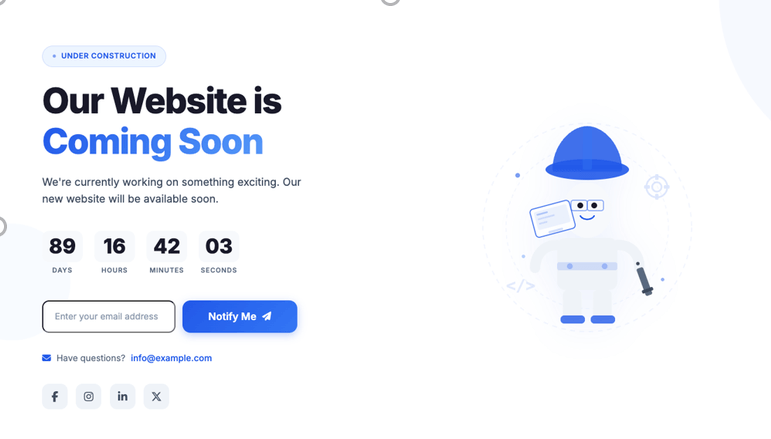
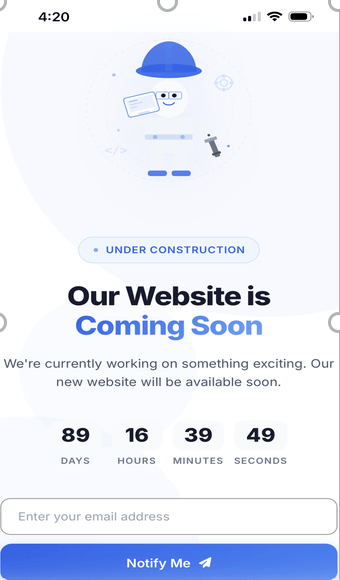
Create a modern "Website Under Construction" landing page. Use a clean, professional design with a white background and blue accents. Display a large headline: "Our Website is Coming Soon" Below the headline, add this text: "We're currently working on something exciting. Our new website will be available soon." Include: Countdown placeholder Email subscription form Contact email: info@example.com Add social media icons for: Facebook Instagram LinkedIn X (Twitter) Include a large illustration of a construction worker or website maintenance graphic. Create a large blue button: "Notify Me" The page must be fully responsive for mobile devices. Use modern typography and subtle animations.
Desktop Version
Mobile Version
After you create your prompt, you can generate your website. The AI will magically create your layout, colors, content, buttons, sections, etc.
You can review the result. If there is something you don’t like, you can ask the AI again and polish the result.
You can chat with the AI to make changes, removals, improvements, etc.
Before publishing your website, consider previewing the desktop and mobile versions of your site and verifying website functionality and content.
Voilà! Your website is now live!!!
Tips for Better AI Prompts
Good prompts are specific.
Instead of writing:
Make me a website.
Try:
Create a modern website for a Canadian web hosting company using blue and white colors. Include a hero section, pricing table, customer testimonials, FAQ, contact form, and footer. Use a professional and clean design with a responsive layout.
Best Practices
When creating prompts:
- Describe the purpose of the website.
- Specify your preferred colors.
- Mention the style (modern, minimalist, professional, playful, etc.).
- List the sections you want.
- Include button text.
- Mention any images or illustrations you would like.
- Specify if the page should be mobile-friendly.
- Include any important contact information or calls to action.
Frequently Asked Questions
Can I edit the website after it has been generated?
Yes. You can continue asking the AI to make changes without having to recreate the entire website.
Do I need programming knowledge?
No. Code with AI is designed for users with little or no programming experience.
Can I regenerate the website?
Yes. You can modify your prompt or create a new one to generate a different version.
Can I add more pages later?
Yes. You can continue expanding your website by creating additional pages and asking the AI to generate new content.
Can I use my own images?
Yes. After generating your website, you can replace the placeholder images with your own photos, logos, or graphics.
Summary
Softaculous Code with AI makes website creation accessible to everyone by allowing you to describe your ideas in plain language. With detailed prompts, you can quickly generate professional-looking pages, refine them through simple conversational requests, preview the results, and publish your website—all without writing a single line of code.
The more information you provide, the better the generated website will match your expectations.
Everything You Need to Get Online
A complete website requires more than just web pages. Funio provides an all-in-one platform that includes:
- Web hosting
- Domain name registration
- Professional email accounts
- SSL certificates
- WordPress hosting
- Managed VPS hosting
- Daily backups
- Website security solutions
- AI-powered website creation tools
Whether you’re creating a personal blog, a business website, an online portfolio, or an e-commerce store, Funio offers scalable hosting plans that grow with your needs.
Ready to Launch Your Website?
With Softaculous Code with AI and Funio hosting, you can go from an idea to a live website in just a few minutes.
Explore our hosting plans, register your domain name, and start building your online presence today. Our platform makes it easy to create, publish, and manage your website, even if you’ve never built one before.
Give it a try, see what it can create, and let AI do some of the heavy lifting.